What Are Zero-Day Exploits? Understanding and Protecting Against Unknown Cyber Threats
A zero-day exploit is an attack that leverages a previously unknown software vulnerability before a patch or mitigation exists, and it is dangerous because defenders have zero prior notice to block the exploit. This article explains what zero-day vulnerabilities are, how attackers weaponize them, and why they pose outsized risk to personal devices and small business systems. Readers will get clear lifecycle steps, recent example incidents from early 2024, and practical prevention strategies including patch management, next-generation antivirus, behavioral analytics, and zero-trust principles. The guide also shows when professional remote support may be appropriate and how mcHelper.com’s remote services map to common zero-day scenarios. Start by learning the core definitions and distinctions between vulnerabilities, exploits, and attacks, then move into real-world examples and an actionable prevention checklist you can apply immediately to reduce exposure to new malware threats.
What Is a Zero-Day Vulnerability? Definition and Key Concepts
A zero-day vulnerability is a software or firmware flaw that is unknown to the vendor and for which no official patch exists, enabling attackers to exploit the flaw immediately after discovery. Because there is no vendor patch or public mitigation at discovery, threat actors can develop exploit code and launch targeted attacks with high success rates. For defenders, the absence of signatures makes traditional antivirus less effective, so detection relies on behavioral indicators and threat intelligence. Understanding this distinction helps prioritize defenses that reduce attack surface and speed detection.
How Does a Zero-Day Exploit Differ from Other Cyberattacks?
Zero-day exploits differ from common cyberattacks like phishing or N-day exploits because they target unknown flaws rather than relying on user deception or published vulnerabilities. Phishing attacks trick users into revealing credentials or executing malicious content, while N-day attacks exploit disclosed flaws that already have vendor patches. The timeline for a zero-day includes discovery, weaponization, and exploitation before disclosure and patching, creating a narrow window where defenses must detect anomalous behavior. Recognizing these differences influences whether you prioritize user training, patch cadence, or behavioral detection tools.
What Is the Lifecycle of a Zero-Day Attack?
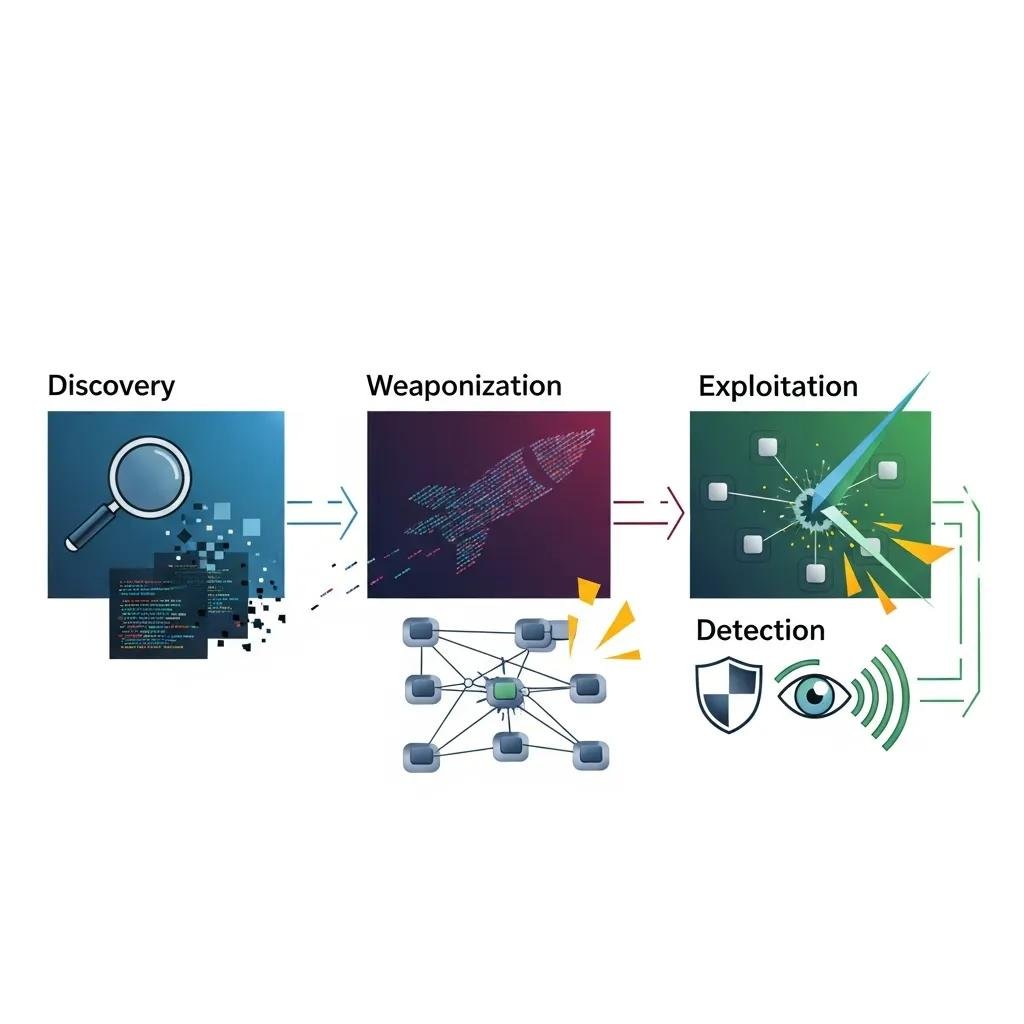
A typical zero-day lifecycle begins with discovery—either by a researcher or attacker—followed by weaponization where exploit code is developed, and then exploitation against targets before detection. Detection may occur via anomaly spotting, threat intelligence feeds, or vendor reports, after which disclosure and patch development occur. The speed of each stage determines damage; faster detection and containment shrink the attacker’s window. Preparing rapid containment steps and monitoring for behavioral indicators allows users to intervene during the exploitation stage.
What Are Common Examples of Zero-Day Attacks in Early 2024?
Several high-impact zero-day incidents in early 2024 demonstrated how diverse targets and vectors can be, from networking appliances to browser engines and remote access appliances. Each example shows the kind of impact users and small businesses face when unknown threats are weaponized, including data theft, remote command execution, and supply-chain implications. Understanding recent patterns helps prioritize controls that are most effective against new malware threats and zero-day attack techniques.
- Cisco AsyncOS zero-day: Enabled remote attackers to execute commands on email gateway devices, risking data interception and lateral movement.
- Apple WebKit zero-day: Targeted browser rendering, allowing drive-by exploitation through web content and putting personal devices at risk.
- SonicWall SMA-class vulnerabilities: Allowed remote access bypasses on VPN appliances, exposing remote workforce connections.
These examples underline the need for layered defenses and rapid response; if you are impacted by a recent zero-day, expert remote remediation such as professional virus and spyware removal is available through mcHelper.com’s security services.
Which Recent Zero-Day Exploits Have Impacted Apple and Cisco Devices?
In early 2024, WebKit-based browser engine flaws for Apple devices led to remote code execution via crafted web content, often exploited in targeted campaigns against high-value users. Similarly, exploits against Cisco AsyncOS and other gateway appliances permitted attackers to run commands with elevated privileges, affecting mail flow and perimeter defenses. Immediate actions for affected users include isolating compromised systems, updating when vendors release mitigations, and enabling multi-factor authentication to reduce account takeover risk. Following these steps buys time for forensic analysis and recovery.
What Lessons Can Be Learned from Notable Zero-Day Incidents?
Notable incidents reinforce several practical lessons for defenders: prioritize rapid patching and vendor advisories, deploy layered detection like behavioral analytics alongside signature-based tools, and implement incident response plans even for smaller environments. Regular backups and network segmentation limit the blast radius if exploitation occurs, while threat intelligence and monitoring reduce time-to-detection. These lessons make clear that preparation, not panic, is the most effective way to limit damage from unknown threats and to enable faster recovery.
How Can You Prevent Zero-Day Attacks? Essential Protection Strategies

Prevention against zero-day attacks relies on layered controls that reduce attack surface and improve detection of anomalous behavior. The following numbered steps prioritize high-impact actions that home users and small businesses can implement without excessive complexity. Applying multiple controls together creates defense-in-depth that compensates for the absence of immediate patches and minimizes the chance an unknown exploit succeeds.
- Keep systems and firmware updated: Regularly apply vendor updates for OS, applications, and device firmware to reduce exploitable surface.
- Use Next-Generation Antivirus (NGAV) and EDR: Deploy behavioral and endpoint detection that looks for anomalies rather than signatures alone.
- Adopt strong authentication and network segmentation: Use MFA and separate critical systems to constrain attacker movement.
- Maintain offline backups and incident playbooks: Ensure recoverability and practiced response steps to shorten remediation time.
Putting these steps into practice involves both automated tooling and simple policies that users can follow; if implementation looks complex, remote experts can assist with configuration and monitoring setup.
Different prevention controls provide complementary benefits; the table below compares common controls to help choose a layered strategy. The table explains detection approaches, primary protections, and limitations for each control type.
| Control | Detection Method | What It Protects | Limitation |
|---|---|---|---|
| Next-Generation Antivirus (NGAV) | Behavioral heuristics and ML | Endpoint malware and unknown threats | Can generate false positives and needs tuning |
| Endpoint Detection & Response (EDR) | Process and telemetry analysis | Lateral movement and post-exploit activity | Requires skilled monitoring to be effective |
| Patch Management | Vendor updates and vulnerability fixes | Known and many unknown exploit windows over time | Dependent on vendor patch release timing |
| Firewall / WAF | Traffic rules and signatures | Network-level attacks and web app exploits | May not stop valid-looking exploit traffic |
This comparison shows why combining NGAV, EDR, regular patching, and perimeter controls yields stronger protection than relying on any single measure.
Why Is Regular Patch Management Critical for Zero-Day Protection?
Regular patch management reduces the pool of vulnerabilities attackers can chain with a zero-day, and it shortens time attackers have to find alternative vectors. Patching addresses N-days quickly and reduces the probability that attackers can combine flaws to achieve privilege escalation. Practical steps include enabling automatic updates where safe, scheduling firmware checks monthly, and using tools that inventory device software versions. Automating patches for widely used applications and monitoring vendor advisories improves resilience and makes behavioral alerts more meaningful.
How Do Next-Generation Antivirus and Behavioral Analytics Detect Unknown Threats?
Next-Generation Antivirus and behavioral analytics detect unknown threats by analyzing process behavior, memory anomalies, and lateral movement patterns rather than relying on static signatures. Machine learning models flag unusual sequences like new child processes spawned by a browser or unexpected credential-access patterns, enabling detection of zero-day malware during execution. These tools are most effective when combined with endpoint telemetry and centralized logging so analysts can correlate events. Layering NGAV with EDR and threat intelligence reduces false positives and improves remediation speed.
How Does mcHelper.com Provide Remote Support for Zero-Day Threat Protection?
mcHelper.com offers remote technical services that map directly to common zero-day needs, including virus and spyware removal, computer and internet security assessments, home wireless network assistance, and VPN support. The company provides 24/7 access to certified technical specialists and a “No Fix – No Fee” guarantee, which assures users seeking remote remediation that assistance is available on demand. Remote access rescue and repair capability lets technicians triage compromised systems quickly without requiring onsite visits. For users in the USA who prefer professional help, mcHelper.com is positioned to assist with detection, cleanup, and preventive configuration.
Below is a service mapping table that clarifies when to contact remote support and what to expect during remediation for common zero-day scenarios.
| Service | When to Call | What to Expect |
|---|---|---|
| Virus & Spyware Removal | If endpoint shows signs of compromise or unexplained behavior | Remote triage, malware scans, removal, and cleanup with follow-up recommendations |
| Computer & Internet Security Assessment | After a data breach or unusual network traffic | Comprehensive security review, configuration hardening, and prioritized fixes |
| VPN Support | When remote access devices are targeted or VPN issues appear | Secure VPN configuration, testing, and guidance to reduce exposure |
| Remote Access Rescue & Repair | If system is unusable or network is isolated | Immediate remote containment, system restoration steps, and monitoring setup |
What Remote Services Help Detect and Remove Zero-Day Malware?
Remote services for zero-day detection typically begin with triage: collecting system logs, capturing volatile memory snapshots, and running behavioral scans to identify anomalous processes. Technicians then isolate affected endpoints, perform deep scans with NGAV tools, remove identified malware, and apply configuration hardening such as disabling vulnerable services or tightening firewall rules. Follow-up monitoring and scheduling of patching or EDR deployment ensure the environment remains protected. When remote work feels overwhelming, these structured steps provide a repeatable path to remediation and recovery.
How Does 24/7 Expert Assistance Enhance Your Cybersecurity Defense?
Always-on expert access shortens time-to-remediation by enabling rapid containment and reducing attacker dwell time, which directly limits data loss and operational impact. Immediate access to certified technicians means faster triage, priority escalation for severe incidents, and hands-on guidance for configuring NGAV, VPNs, and backups. The “No Fix – No Fee” guarantee and 24/7 availability provide practical assurances for users who need urgent help. Continuous support complements automated defenses by offering human judgment for complex zero-day indicators and coordinating next steps with minimal delay.