Smart Home Security: Essential Strategies to Protect Your Connected Devices
Smart home security means protecting the devices, networks, and data that make a residence “connected,” and it matters now because households increasingly depend on Internet of Things (IoT) devices for daily routines, comfort, and safety. This article explains the most common threats to connected home security, step-by-step network hardening measures, device-level protection tips, and practical privacy actions readers can implement today to reduce risk. You will learn how attackers find and exploit devices, which router and Wi-Fi settings matter most, how to segment networks to limit lateral movement, and the privacy toggles that minimize data collection. Actionable checklists, comparison tables, and quick mitigation steps target readers who want fast wins along with longer-term hygiene. Recent research and current trends show that combining firmware discipline, strong authentication, and simple network controls yields the biggest reduction in smart home data and IoT device privacy exposure, and the guidance below maps directly to those techniques.
mcHelper.com’s Computer & Internet Security expertise aligns with these fundamentals and can provide remote assistance for homeowners who need help implementing router and Wi-Fi recommendations; their 24/7 remote support and “no fix — no fee” promise make technical troubleshooting an option when configuration or firmware issues exceed in-home capabilities.
What Are the Key Threats to Smart Home Cybersecurity?

Smart home cybersecurity threats are the specific ways attackers compromise devices, networks, or data to steal information, control devices, or build botnets. Attackers exploit open services, default credentials, unpatched firmware, and insecure cloud APIs to gain access and then perform lateral movement or persistency to extract value. The immediate benefit of understanding threat types is that homeowners can map mitigations—like stronger authentication or segmentation—directly to the threat they face. Below is a concise list of the top five threats and short mitigation steps that prepare readers for the deeper technical guidance that follows.
Smart home risk reduction starts with threat awareness, which then guides network hardening and device-level controls in the next sections.
Top five threats and mitigations:
- Device hijacking: Attackers take control of a camera, lock, or thermostat — mitigate by enforcing unique credentials and MFA where available.
- Data leakage: Unencrypted telemetry or excessive cloud logging exposes personal information — mitigate by minimizing cloud use and reviewing retention settings.
- Botnet inclusion: Compromised IoT devices are conscripted for distributed attacks — mitigate by timely firmware updates and network isolation.
- Credential theft: Phishing or default passwords enable access to accounts — mitigate by strong passwords, password managers, and MFA.
- Insecure APIs/cloud services: Weak or over-permissive APIs allow third-party data access — mitigate by limiting third-party integrations and reviewing permissions.
Intro to table: The following comparison clarifies these threat types, their likelihood/impact, and direct mitigations homeowners can apply.
| Threat | Threat Type | Likelihood / Impact | Example Mitigation |
|---|---|---|---|
| Device hijacking | Unauthorized control | Medium likelihood / High impact | Replace defaults, use unique admin credentials, enable MFA |
| Data leakage | Personal data exposure | High likelihood / Medium impact | Restrict cloud backups, enable encryption, purge logs regularly |
| Botnet inclusion | Distributed attack participation | Medium likelihood / High impact | Keep firmware current, segment IoT on guest/VLAN networks |
This table highlights that timely firmware updates, credential hygiene, and segmentation are central mitigations across multiple threat types; the next section shows how to implement those network controls.
How Do Cybersecurity Threats Like Hacking and Malware Target IoT Devices?
Hacking and malware typically target IoT devices by discovering internet-exposed services, exploiting default or weak credentials, and leveraging unpatched vulnerabilities in firmware or web interfaces. Attackers scan ranges for open ports, probe UPnP and exposed management interfaces, then use common exploits to gain initial access and deploy malware that can persist or pivot. A recent pattern involves automated scanners enrolling vulnerable devices into botnets, which then execute distributed denial-of-service (DDoS) or proxying tasks. Understanding these discovery and exploitation steps helps homeowners prioritize mitigations like closing unnecessary ports, disabling remote admin, and monitoring unexpected outbound connections.
Recognizing the attack flow from discovery to persistence makes it clear why network controls and device hardening are the next logical defenses to deploy.
What Are the Most Common Vulnerabilities in Connected Home Security?
Common vulnerabilities in connected homes include default/weak passwords, absent multi-factor authentication, delayed or missing firmware updates, insecure communication protocols, and over-permissive cloud integrations. Each of these enables attackers to move from a single compromised sensor to richer data or device control. For example, an always-on camera with cloud storage and default credentials presents multiple attack vectors: credential stuffing, API abuse, and data exfiltration. Immediate fixes include changing default logins, enabling MFA when available, disabling unused cloud features, and scheduling automatic firmware checks.
Addressing these weaknesses at the device and network level reduces both the probability of compromise and the potential impact if a device is breached.
How Can You Secure Your Smart Home Network Effectively?
Securing a smart home network means hardening the router, enforcing strong Wi-Fi encryption, and creating separated networks for IoT and personal devices to limit attacker movement. The mechanism is simple: apply least-privilege network access, close exposed management interfaces, and monitor firmware and logs so compromises are detected early. The value is a dramatically smaller attack surface and containment capability that prevents a compromised camera from reaching personal laptops or phones. Below are step-by-step router and segmentation checks that homeowners can implement within a single maintenance session.
These network controls are foundational; if implementation becomes complex, the next paragraph explains when to get remote technical help.
Intro to table: The following table maps key network components to common vulnerabilities and actionable homeowner steps.
| Network Component | Vulnerability | Recommended Action |
|---|---|---|
| Router admin interface | Default credentials, remote management | Change admin username, disable remote admin, enable strong password |
| Wi-Fi encryption | Weak/WEP or open networks | Use WPA3 or WPA2-AES, strong passphrase, unique SSID name |
| Segmentation (guest/VLAN) | Flat network allows lateral movement | Create guest/VLAN for IoT, restrict inter-VLAN routing |
This comparison emphasizes that router and Wi-Fi settings directly reduce exposure; next are concrete best practices for those settings.
If configuring router firmware, encryption modes, or VLANs seems daunting, mcHelper.com offers remote Computer & Internet Security support that helps homeowners implement recommended router and Wi-Fi settings. Their 24/7 remote assistance and “no fix — no fee” approach provide an option for secure, guided configuration when local troubleshooting is insufficient.
What Are Best Practices for Router and Wi-Fi Security in Smart Homes?
Router and Wi-Fi best practices focus on administrative hygiene, encryption choices, and reducing attack surface by disabling unnecessary features. Change the default admin username and use a long, unique password stored in a password manager, disable WPS and UPnP if not needed, and turn off remote management unless required. Prioritize WPA3 where available or WPA2-AES if hardware is older, and set a separate SSID for IoT with a unique passphrase. Keep router firmware current and enable automatic updates where possible; many modern routers support scheduled firmware checks and alerts.
Applying these steps converts general network security principles into concrete router settings, which then leads to why segmentation matters for limiting compromise impact.
How Does Network Segmentation Enhance Smart Home Security?
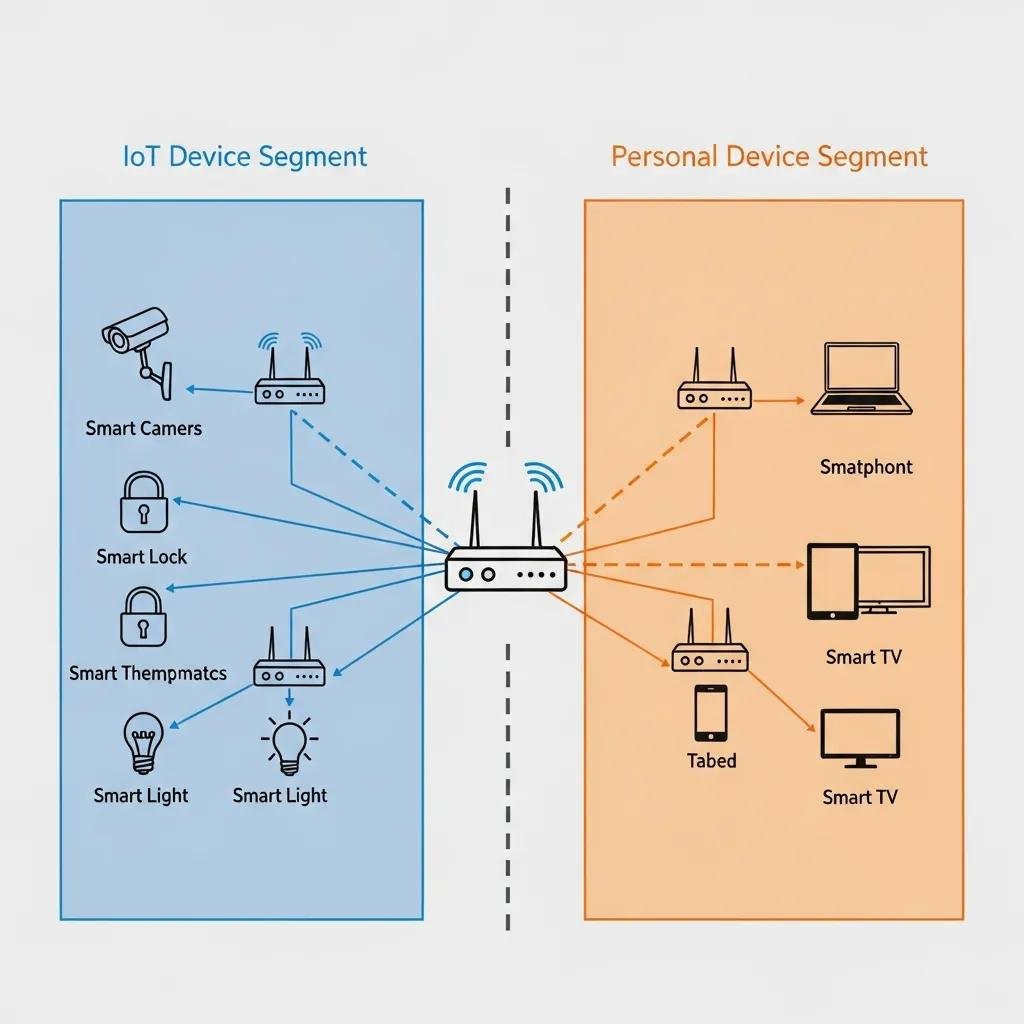
Network segmentation isolates IoT devices from high-value personal devices so that if an IoT sensor is compromised, attackers cannot easily reach laptops, phones, or NAS storage. A common approach is to create a dedicated guest SSID or VLAN for all IoT and smart home devices, restrict inter-VLAN routing, and enforce firewall rules that block inbound connections to local resources. This reduces lateral movement, confines the blast radius of any breach, and simplifies monitoring by grouping similar traffic. For advanced users, local intrusion prevention rules or lightweight IDS can detect unusual outbound connections typical of botnets.
Partitioning devices by function limits damage and supports recovery procedures, which prepares homeowners to harden individual devices as the next step.
What Are Practical IoT Device Protection Tips for Smart Home Users?
Practical protection starts with unique credentials, enabling automatic firmware updates, minimizing data sharing, and disabling unused sensors or cloud features. The mechanism is device hardening: reduce privileged access, ensure authenticity of updates, and restrict telemetry so devices only transmit what’s necessary. These actions yield immediate reductions in exposure and make it much harder for opportunistic attackers to succeed. Below are device-class hardening steps plus a compact table showing when to contact support for troubleshooting that you can use as a checklist.
Intro to table: The table below helps homeowners prioritize hardening steps across common device types and when remote support may be appropriate.
| Device Type | Common Weakness | Hardening Step | When to Contact Support |
|---|---|---|---|
| Smart camera | Cloud storage, default creds | Use local storage if possible, change credentials, enable encryption | When camera firmware update fails or network drop persists |
| Smart lock | Weak auth, Bluetooth gaps | Enable strong PINs, require app authentication, update firmware | If lock loses pairing or shows repeated auth failures |
| Smart thermostat | Open APIs, telemetry | Limit cloud integrations, restrict permissions, enable auto-update | When device fails to update or reports unexpected schedules |
This checklist clarifies practical steps and highlights when remote intervention can avoid misconfiguration or compatibility issues.
For device compatibility checks or remote troubleshooting, mcHelper.com’s remote technical support can assist with verifying firmware updates and resolving connectivity problems so homeowners can apply hardening steps confidently.
How to Harden Smart Devices with Strong Authentication and Firmware Updates?
Hardening devices begins with creating per-device unique passwords, using a password manager to store long passphrases, and enabling multi-factor authentication where the device or associated account supports it. Configure automatic firmware updates or subscribe to vendor alerts, and verify update signatures where supported to avoid installing unofficial images. Remove or disable unused features such as cloud backups, voice history retention, or third-party integrations. If an update or authentication change fails, document the device model and current firmware before escalating to support, which aids remote diagnosis.
These device hardening measures work together to minimize vectors for attacker entry and reduce the need for reactive incident response.
What Privacy Settings Should You Configure to Protect Your Data?
Privacy settings to check include data sharing toggles, voice assistant history retention, camera cloud backups, and geolocation permissions in vendor apps. Prefer local-only storage when the option exists, limit third-party integrations, and set shortest practical retention periods for logs and recordings. Regularly review and purge voice and usage histories, and audit app permissions to ensure sensors or microphone access are granted only when required. These settings reduce the amount of personal data that can be used for profiling or targeted scams.
Minimizing retained personal data lowers the impact of any eventual breach and complements the security controls discussed earlier by reducing the value of compromised data.
Why Is Data Privacy Crucial for Smart Home Security?
Data privacy is crucial because smart devices continuously collect behavioral signals—audio, video, occupancy, usage schedules—that can reveal personal routines and vulnerabilities. When privacy controls are lax, attackers or third parties can reconstruct daily patterns, enabling targeted scams, stalking, or even facilitating burglaries. The solution is minimizing collected data, preferring local processing, and applying encryption and strict retention policies. Understanding privacy as part of security shifts homeowner decisions from convenience-first to risk-aware configurations that preserve both convenience and safety.
Recognizing privacy consequences motivates the next section’s explanation of how devices collect and process data in common flows.
How Do Smart Devices Collect and Use Personal Data?
Smart devices typically collect sensor data locally, process it on-device or send it to vendor cloud services, which then apply analytics and may store results or share with third parties via APIs. Common data types include audio snippets, video footage, telemetry logs, and usage patterns that reveal schedules and preferences. Clouds may retain aggregated or raw data for varying retention windows and may expose data to analytics partners or law enforcement requests depending on vendor policy. Understanding these flows helps homeowners choose devices and settings that favor local processing or strong encryption.
Tracing these data flows clarifies where to intervene—either by disabling cloud features, enforcing encryption, or limiting retention—to reduce exposure.
What Measures Can Users Take to Minimize Privacy Risks?
Users can minimize privacy risks by applying data minimization, choosing local storage when available, disabling unnecessary sensors, and reviewing privacy policies periodically. Implement strict app permissions, clear voice assistant histories regularly, and prefer vendors that offer transparent retention policies or on-device processing. Consider periodic audits of connected services and revoke third-party access that is no longer needed. These measures trade small conveniences for substantial reductions in surveillance and profiling risk.
Regular privacy audits combined with the security hygiene discussed earlier form a durable strategy that protects both devices and the personal data they generate.