A Guide to Fixing Security Router Wi-Fi Issues: Setup, Configuration & Troubleshooting
Introduction
Ensuring a secure and stable internet connection requires properly configuring security software, routers, and Wi-Fi networks. This guide addresses common setup, configuration, and troubleshooting problems related to security software, routers, and Wi-Fi connectivity.

Part 1: Security Software Setup & Configuration Issues
Common Issues:
- Installation Failures – Incompatibility or system conflicts.
- Activation & License Issues – Invalid or expired keys.
- Firewall & Scanning Errors – Blocking legitimate programs or failing to scan.
- Performance Slowdowns – System lag caused by high resource usage.
Solutions:
- Check System Compatibility – Ensure your OS supports the security software.
- Use Administrator Privileges – Run the installer as an administrator.
- Disable Conflicting Software – Uninstall old security programs before installing new ones.
- Update Security Definitions – Keep antivirus and firewall rules up to date.
- Adjust Firewall Settings – Allow trusted apps through the firewall.
Part 2: Router Setup, Customization & Configuration Problems
Common Issues:
- Incorrect Router Placement – Weak signal due to poor positioning.
- Firmware Issues – Outdated firmware affecting performance.
- Configuration Errors – Wrong settings preventing proper functionality.
- Slow Speed or Frequent Disconnections – Network congestion or interference.
Solutions:
- Proper Placement – Keep the router centrally located and elevated.
- Update Firmware – Access router settings and install the latest firmware.
- Check Connection Settings – Ensure correct ISP credentials and DNS settings.
- Reduce Interference – Avoid placing the router near microwaves or thick walls.
- Reset to Factory Defaults – Restore settings if persistent issues occur.
Part 3: Wi-Fi Not Working
Common Issues:
- No Internet Access – Network connected but no access.
- Weak Signal Strength – Poor coverage in certain areas.
- Authentication Errors – Incorrect Wi-Fi password or security settings.
- IP Configuration Issues – Conflicts preventing connection.
Solutions:
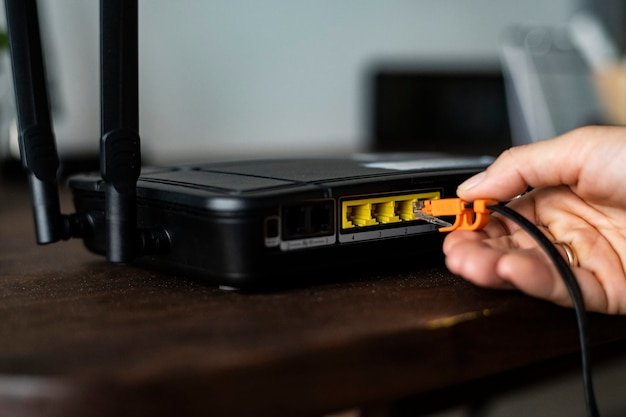
- Restart the Router & Modem – Power cycle devices to refresh the connection.
- Forget and Reconnect to the Network – Re-enter the Wi-Fi password.
- Check ISP Service Status – Contact the ISP if an outage is suspected.
- Adjust Wi-Fi Channel Settings – Reduce interference by changing channels.
- Assign a Static IP Address – Prevent conflicts by manually setting an IP.

Security Router & Wi-Fi Issues: Setup, Config & Troubleshooting
- Regularly update router firmware and security software.
- Use strong passwords for Wi-Fi and router admin access.
- Enable WPA3 or WPA2 encryption for secure Wi-Fi connections.
- Avoid overcrowding the network with too many connected devices.
- Periodically restart network devices for optimal performance.
Conclusion
By following these troubleshooting steps, you can resolve security software setup issues, router configuration problems, and Wi-Fi connectivity failures. If problems persist, consider contacting technical support for further assistance.